Kickstart Your Loyalty Program with Customer Onboarding
Seamless and efficient onboarding is essential for building strong, lasting relationships that improve customer satisfaction and loyalty.
This section will guide you through enrolling customers into the DejavooExtra Loyalty Program, ensuring they can immediately begin enjoying the benefits. Let’s make the onboarding process smooth and efficient for both you and your customers!
Enrolling Customers in the Loyalty Program
To enable your customers to benefit from the DejavooExtra Loyalty, start by enrolling them in your program.
Navigating the Loyalty Home Screen
The following items are displayed on the loyalty home screen:
Collapsed Menu
Cart Icon
Amount Entry Field
Back Button
OK Button
Accessing Menu Options
Click on the Collapsed Menu to reveal the available options on the loyalty home screen, which include:
Fast Enrollment
Join the Club
Refund
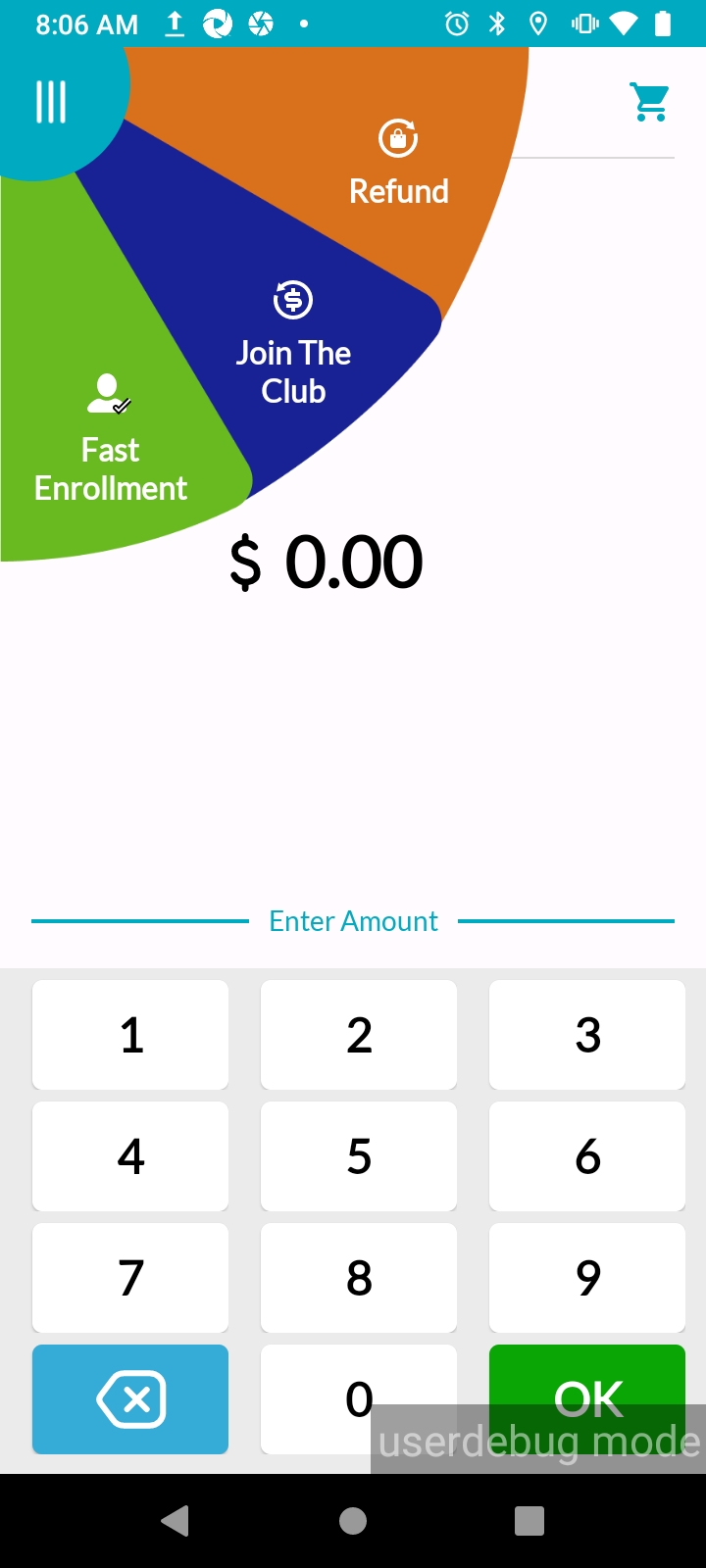
You will see two different customer enrollment options: "Join the Club" and "Fast Enrollment" on the menu. “Join the Club” option completes the full onboarding process, and “Fast Enrollment” starts the onboarding process as well as benefits accumulation for your customers yet requires further action from the customer to become a member. The choice between these options depends on the time sensitivity for both the customer and the merchant.
Join The Club
Start enrolling your customers by clicking the “Join the Club” option from the menu and display the membership form on the screen. The membership form includes the following information to be filled out according to the field entry rules.
Fields & Entry Rules
First Name | Enter your customer’s name using alphabetic characters |
Last Name | Enter your customer’s surname using alphabetic characters. |
Enter your customer's email address according to standard email format (e.g.,example@email.com) | |
Mobile Phone Number | Enter your customer's mobile phone number using numeric characters. |
Birthdate | Enter your customer's birthdate using the format specified (e.g., DD/MM/YYYY). This field is restricted to ages 12 and above. |
Referral Code | Enter the unique referral code if your customer was referred by an existing loyalty program member. |
Loyalty Program Consent | Consent to the terms and conditions of loyalty program membership. |
Communication Consent | Consent to receive marketing communications and promotions. |
Signature | Customer’s electronic signature. |
Note!
All fields -except the communication consent field- are required to be filled.
1. Fill out the “Join the Club” membership form
Fill out the “Join the Club” membership form by referring “Fields & Entry Rules”, check the “Loyalty Program Consent” and the “Communication Consent” check boxes according to your customer’s preference and get the electronic signature of your customer in the “Signature” field (your customer can simply sign with their fingertip). Click the “Submit” button after completing all the entries. The system will control whether the customer's email address and mobile phone number already exist within your loyalty program.
Note!
If the provided customer email address and phone number already exists, a warning message will be displayed on the screen. It will be necessary to enter a different email or a mobile phone number to proceed. New loyalty members can only be created with unregistered email addresses and mobile phone numbers.
2. Tap, insert or swipe customer bank card
Tap, insert or swipe your customer’s debit or credit card to enable the card as your customer’s Loyalty Identifier. The system will verify the card and create a unique identification number without saving the bank card’s information such as card number, expiration date or CVV. Provided bank card will be registered and recognized as your customer’s unique loyalty member identifier.
Once the card is successfully registered as the New Member’s Loyalty Identifier in the system, a “You are now a member of our club. You will earn benefits with every purchase” message will be displayed on the terminal screen.
Note!
If the bank card has been previously defined in the system, a warning message will be displayed as “This card is already registered. Please use a different card.” indicating that your customer is already enrolled in the loyalty system with the provided credit or debit card', in this case you can proceed to sale as existing loyalty member.
3. Complete the 'Join The Club' Enrollment
Upon completing the “Join The Club” membership form and identifying the card, your customer will become your new loyalty member. Your customer will receive a “Join The Club Welcome” message at their provided email address, along with the merchant portal link and a temporary password.
Congratulations! You have successfully enrolled your customer in the DejavooExtra Loyalty Program.
Now you can view your new member from DejavooExtra Merchant Portal, under the “Members” section.
Your members can also view their membership details and transactions from the DejavooExtra Member Portal by accessing www.dejavooextra.com
Fast Enrollment
“Fast Enrollment” option is designed to have your customers start benefiting from loyalty program without filling the full “Join the Club” form. The main difference between “Fast Enrollment” and “Join the Club” is the information received from the customer. To fully benefit from their membership, customers must complete all the missing information and approvals later.
Note!
When the customer is enrolled in the loyalty system with the “Fast Enrollment” option, the rights earned from the sales transaction will be stored by the system. Once missing membership information is completed, loyalty point redemption feature will be enabled for the Member.
Select the “Fast Enrollment” option from the menu.
1. Tap, insert or swipe customer bank card
Tap, insert or swipe your customer’s debit or credit card to enable the card as your customer’s Loyalty Identifier. The system will verify the card and create a unique identification number without saving the bank card’s information such as card number, expiration date or CVV. Provided bank card will be registered and recognized as your customer’s unique loyalty member identifier.
2. Fill out the Fast Enrollment form
Fill out the “Fast Enrollment” form by asking the customer which channel they prefer to receive the membership form through. Enter the email address or mobile phone number, check the “Contract Consent” and the “Communication Consent” check boxes according to your customer’s preference and get the electronic signature of your customer in the “Signature” field. Click the “Continue” button and display the “You are now a member of our club. You will earn benefits with every purchase” message on the screen.
3. Complete the Fast Enrollment
Upon registering the card and completing the Fast Enrollment form, your customer will become your new loyalty member. Your customer will receive a welcome message with the subject title “Your Points Are Waiting – Complete Enrollment to Start Redeeming” including the landing page link, sent to their preferred channel (phone number or email address) to complete the required information at their convenience.
Note!
It is important to enroll your customers quickly as your Loyalty Member, it is equally important to encourage them to fill the missing information, so that they can enjoy their personalized campaigns, and redeem their rewards while shopping with you.
🎉Congratulations! You have successfully enrolled your customer in the DejavooExtra Loyalty Program.
Now you can view your new member from DejavooExtra Merchant Portal, under the “Members” section.
After completing the required information, your members can also view their membership details from the Dejavoo Extra Member Portal. Follow the steps provided under the “Complete the membership information” section.
Complete the membership information
Following the “Fast Enrollment” process, your new loyalty member must complete their information to be able to redeem their points.
Your member will receive the landing page link via Email or SMS. Your member can access the membership form by clicking the link in the “Your Points Are Waiting – Complete Enrollment to Start Redeeming” message, and fill out the following information:
Name
Last Name
Email
Mobile Phone Number
Birthdate
.png "image(205).png")
After completing all the required membership information, your members will receive an email with a subject line: ‘‘Welcome to the DejavooExtra Club - Let’s Get Started!’’ containing the DejavooExtra Member Portal link and a temporary password.
Remember!
Your members who enrolled in the loyalty program with Fast Enrollment will continue to earn points from their purchases even if they do not complete the membership information. However, only members who have completed their membership information will be able to redeem or benefit from Birthday Campaigns. Additionally, these members will receive a "Happy Birthday" email on their birthday with their name personalized in the greeting.